How to Create Tailwind CSS Table-Comprehensive Guide with Templates & Examples
By Emmanuel Chinonso - Frontend Engineer and Technical Writer at Windframe
In today’s data-driven world, tables are an essential component for displaying information in a structured and readable format. Tailwind CSS, with its utility-first approach, makes it incredibly easy to create beautiful and responsive tables that can enhance the user experience of your web applications. In this guide, We will explore different Tailwind CSS table templates, border styles, and how to design Tailwind tables that fit your specific needs.
Table of Contents
- Introduction
- Why Use Tailwind CSS for Tables?
- Prerequisites
- Step 1: Setting Up Your Project
- Step 2: Creating a Basic Table
- Building the Tailwind CSS table example
- Conclusion
Introduction
Tailwind CSS offers a flexible and efficient way to style HTML elements, including tables. With its pre-defined utility classes, developers can quickly design tables that are not only visually appealing but also fully responsive across various devices.
Why Use Tailwind CSS for Tables?
-
Ease of Use: Tailwind CSS offers utility classes that make styling tables intuitive and straightforward.
-
Responsiveness: Tailwind’s responsive design capabilities ensure your tables look great on any device.
-
Consistency: Utility classes help maintain consistent design patterns across your web application.
-
Customization: Tailwind CSS gives you complete control over the appearance of your tables, allowing for extensive customization options.
Prerequisites
Before getting started, ensure you have the following installed on your machine:
- Node.js (v16 or later): Download from Node.js Official Website .
- npm or yarn : Comes bundled with Node.js.
- Basic Knowledge of HTML & CSS : Familiarity with these technologies will be beneficial.
Step 1: Setting Up Your Project
If you haven’t already set up a project with Tailwind CSS, follow these steps:
- Initialize a Project : Start by initializing a new project folder.
1mkdir my-tailwind-table23cd my-tailwind-table4npm init -y
- Install Tailwind CSS : Install Tailwind CSS and its dependencies.
1npm install tailwindcss postcss autoprefixer
- Initialize Tailwind CSS : Generate the necessary configuration files.
1npx tailwindcss init -p
This will create tailwind.config.js and postcss.config.js files in your project directory.
Step 2: Creating a Basic Table
After the installation of tailwind CSS, we can now build a basic Tailwind table.
Basic Tailwind Table
This table uses alternating row colors for readability.
1<div class="overflow-x-auto m-10 rounded-md">2 <table class="min-w-full bg-white border border-gray-300">3 <thead class="bg-gray-200">4 <tr>5 <th class="px-4 py-2 text-left">Name</th>6 <th class="px-4 py-2 text-left">Email</th>7 <th class="px-4 py-2 text-left">Role</th>8 </tr>9 </thead>10 <tbody>11 <tr class="bg-gray-100">12 <td class="border px-4 py-2">John Doe</td>13 <td class="border px-4 py-2">john@example.com</td>14 <td class="border px-4 py-2">Admin</td>15 </tr>16 <tr>17 <td class="border px-4 py-2">Jane Smith</td>18 <td class="border px-4 py-2">jane@example.com</td>19 <td class="border px-4 py-2">Editor</td>20 </tr>21 <tr class="bg-gray-100">22 <td class="border px-4 py-2">Sam Brown</td>23 <td class="border px-4 py-2">sam@example.com</td>24 <td class="border px-4 py-2">User</td>25 </tr>26 <tr>27 <td class="border px-4 py-2">Paul Atrides</td>28 <td class="border px-4 py-2">Atrides@example.com</td>29 <td class="border px-4 py-2">User</td>30 </tr>31 </tbody>32 </table>33</div>
Preview
| Name | Role | |
|---|---|---|
| John Doe | john@example.com | Admin |
| Jane Smith | jane@example.com | Editor |
| Sam Brown | sam@example.com | User |
| Paul Atrides | Atrides@example.com | User |
Building the Tailwind CSS table example
Hoverable Table
This table highlights rows when hovered, ideal for interactive UI.
1<div class="overflow-x-auto m-10 rounded-md">2 <table class="min-w-full bg-white border border-gray-300">3 <thead class="bg-indigo-500 text-white">4 <tr>5 <th class="border px-4 py-2">Product</th>6 <th class="border px-4 py-2">Price</th>7 <th class="border px-4 py-2">Stock</th>8 </tr>9 </thead>10 <tbody>11 <tr class="hover:bg-indigo-50">12 <td class="border px-4 py-2">Laptop</td>13 <td class="border px-4 py-2">$1200</td>14 <td class="border px-4 py-2">In Stock</td>15 </tr>16 <tr class="hover:bg-indigo-50">17 <td class="border px-4 py-2">Smartphone</td>18 <td class="border px-4 py-2">$800</td>19 <td class="border px-4 py-2">Out of Stock</td>20 </tr>21 <tr class="hover:bg-indigo-50">22 <td class="border px-4 py-2">Headphones</td>23 <td class="border px-4 py-2">$200</td>24 <td class="border px-4 py-2">In Stock</td>25 </tr>26 </tbody>27 </table>28</div>
Preview
| Product | Price | Stock |
|---|---|---|
| Laptop | $1200 | In Stock |
| Smartphone | $800 | Out of Stock |
| Headphones | $200 | In Stock |
Table with Pagination
This table includes pagination controls at the bottom.
1<div class="overflow-x-auto m-10 rounded-md">2 <table class="min-w-full bg-white border border-gray-300">3 <thead class="bg-gray-200">4 <tr>5 <th class="px-4 py-2 text-left">Product</th>6 <th class="px-4 py-2 text-left">Price</th>7 <th class="px-4 py-2 text-left">Stock</th>8 </tr>9 </thead>10 <tbody>11 <tr class="bg-white">12 <td class="border px-4 py-2">Laptop</td>13 <td class="border px-4 py-2">$1200</td>14 <td class="border px-4 py-2">In Stock</td>15 </tr>16 <tr>17 <td class="border px-4 py-2">Smartphone</td>18 <td class="border px-4 py-2">$800</td>19 <td class="border px-4 py-2">Out of Stock</td>20 </tr>21 <tr class="bg-white">22 <td class="border px-4 py-2">Headphones</td>23 <td class="border px-4 py-2">$200</td>24 <td class="border px-4 py-2">In Stock</td>25 </tr>26 <tr class="bg-white">27 <td class="border px-4 py-2">Wristwatches</td>28 <td class="border px-4 py-2">$500</td>29 <td class="border px-4 py-2">In Stock</td>30 </tr>31 <tr class="bg-white">32 <td class="border px-4 py-2">Louder Speakers</td>33 <td class="border px-4 py-2">$1200</td>34 <td class="border px-4 py-2">Out Stock</td>35 </tr>36 </tbody>37 </table>3839 <div class="flex justify-between items-center py-2">40 <span class="text-sm text-gray-700">Showing 1 to 5 of 30 entries</span>41 <div class="inline-flex mt-2">42 <button43 class="px-3 py-1 bg-gray-200 border border-gray-300 rounded-l-md hover:bg-gray-300"44 >45 Previous46 </button>47 <button48 class="px-3 py-1 bg-gray-200 border border-gray-300 hover:bg-gray-300"49 >50 151 </button>52 <button53 class="px-3 py-1 bg-gray-200 border border-gray-300 hover:bg-gray-300"54 >55 256 </button>57 <button58 class="px-3 py-1 bg-gray-200 border border-gray-300 rounded-r-md hover:bg-gray-300"59 >60 Next61 </button>62 </div>63 </div>64</div>
Preview
| Product | Price | Stock |
|---|---|---|
| Laptop | $1200 | In Stock |
| Smartphone | $800 | Out of Stock |
| Headphones | $200 | In Stock |
| Wristwatches | $500 | In Stock |
| Louder Speakers | $1200 | Out Stock |
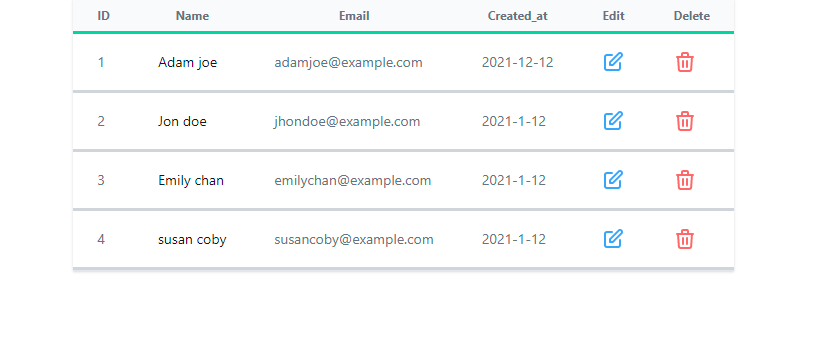
Table with Delete and Edit button.
This is a Tailwind Table with a delete and edit button on each items on the table.
1<div class="container flex justify-center mx-auto">2 <div class="flex flex-col">3 <div class="w-full">4 <div class="border-b border-gray-200 shadow">5 <table class="divide-y divide-green-400">6 <thead class="bg-gray-50">7 <tr>8 <th class="px-6 py-2 text-xs text-gray-500">ID</th>9 <th class="px-6 py-2 text-xs text-gray-500">Name</th>10 <th class="px-6 py-2 text-xs text-gray-500">Email</th>11 <th class="px-6 py-2 text-xs text-gray-500">Created_at</th>12 <th class="px-6 py-2 text-xs text-gray-500">Edit</th>13 <th class="px-6 py-2 text-xs text-gray-500">Delete</th>14 </tr>15 </thead>16 <tbody class="bg-white divide-y divide-gray-300">17 <tr class="whitespace-nowrap">18 <td class="px-6 py-4 text-sm text-gray-500">1</td>19 <td class="px-6 py-4">20 <div class="text-sm text-gray-900">Adam joe</div>21 </td>22 <td class="px-6 py-4">23 <div class="text-sm text-gray-500">adamjoe@example.com</div>24 </td>25 <td class="px-6 py-4 text-sm text-gray-500">2021-12-12</td>26 <td class="px-6 py-4">27 <a href="#">28 <svg29 xmlns="http://www.w3.org/2000/svg"30 class="w-6 h-6 text-blue-400"31 fill="none"32 viewBox="0 0 24 24"33 stroke="currentColor"34 >35 <path36 stroke-linecap="round"37 stroke-linejoin="round"38 stroke-width="2"39 d="M11 5H6a2 2 0 00-2 2v11a2 2 0 002 2h11a2 2 0 002-2v-5m-1.414-9.414a240 2 0 112.82841 2.828L11.828 15H9v-2.828l8.586-8.586z"42 />43 </svg>44 </a>45 </td>46 <td class="px-6 py-4">47 <a href="#">48 <svg49 xmlns="http://www.w3.org/2000/svg"50 class="w-6 h-6 text-red-400"51 fill="none"52 viewBox="0 0 24 24"53 stroke="currentColor"54 >55 <path56 stroke-linecap="round"57 stroke-linejoin="round"58 stroke-width="2"59 d="M19 7l-.867 12.142A2 2 0 0116.138 21H7.862a2 2 0 01-1.995-1.858L5 7m560 4v6m4-6v6m1-10V4a1 1 0 00-1-1h-4a1 1 0 00-1 1v3M4 7h16"61 />62 </svg>63 </a>64 </td>65 </tr>66 <tr class="whitespace-nowrap">67 <td class="px-6 py-4 text-sm text-gray-500">2</td>68 <td class="px-6 py-4">69 <div class="text-sm text-gray-900">Jon doe</div>70 </td>71 <td class="px-6 py-4">72 <div class="text-sm text-gray-500">jhondoe@example.com</div>73 </td>74 <td class="px-6 py-4 text-sm text-gray-500">2021-1-12</td>75 <td class="px-6 py-4">76 <a href="#">77 <svg78 xmlns="http://www.w3.org/2000/svg"79 class="w-6 h-6 text-blue-400"80 fill="none"81 viewBox="0 0 24 24"82 stroke="currentColor"83 >84 <path85 stroke-linecap="round"86 stroke-linejoin="round"87 stroke-width="2"88 d="M11 5H6a2 2 0 00-2 2v11a2 2 0 002 2h11a2 2 0 002-2v-5m-1.414-9.414a2 2 0 112.82889 2.828L11.828 15H9v-2.828l8.586-8.586z"90 />91 </svg>92 </a>93 </td>94 <td class="px-6 py-4">95 <a href="#">96 <svg97 xmlns="http://www.w3.org/2000/svg"98 class="w-6 h-6 text-red-400"99 fill="none"100 viewBox="0 0 24 24"101 stroke="currentColor"102 >103 <path104 stroke-linecap="round"105 stroke-linejoin="round"106 stroke-width="2"107 d="M19 7l-.867 12.142A2 2 0 0116.138 21H7.862a2 2 0 01-1.995-1.858L5 7m5108 4v6m4-6v6m1-10V4a1 1 0 00-1-1h-4a1 1 0 00-1 1v3M4 7h16"109 />110 </svg>111 </a>112 </td>113 </tr>114 <tr class="whitespace-nowrap">115 <td class="px-6 py-4 text-sm text-gray-500">3</td>116 <td class="px-6 py-4">117 <div class="text-sm text-gray-900">Emily chan</div>118 </td>119 <td class="px-6 py-4">120 <div class="text-sm text-gray-500">emilychan@example.com</div>121 </td>122 <td class="px-6 py-4 text-sm text-gray-500">2021-1-12</td>123 <td class="px-6 py-4">124 <a href="#">125 <svg126 xmlns="http://www.w3.org/2000/svg"127 class="w-6 h-6 text-blue-400"128 fill="none"129 viewBox="0 0 24 24"130 stroke="currentColor"131 >132 <path133 stroke-linecap="round"134 stroke-linejoin="round"135 stroke-width="2"136 d="M11 5H6a2 2 0 00-2 2v11a2 2 0 002 2h11a2 2 0 002-2v-5m-1.414-9.414a2 2 0137 112.828 2.828L11.828 15H9v-2.828l8.586-8.586z"138 />139 </svg>140 </a>141 </td>142 <td class="px-6 py-4">143 <a href="#">144 <svg145 xmlns="http://www.w3.org/2000/svg"146 class="w-6 h-6 text-red-400"147 fill="none"148 viewBox="0 0 24 24"149 stroke="currentColor"150 >151 <path152 stroke-linecap="round"153 stroke-linejoin="round"154 stroke-width="2"155 d="M19 7l-.867 12.142A2 2 0 0116.138 21H7.862a2 2 0 01-1.995-1.858L5 7m5156 4v6m4-6v6m1-10V4a1 1 0 00-1-1h-4a1 1 0 00-1 1v3M4 7h16"157 />158 </svg>159 </a>160 </td>161 </tr>162 <tr class="whitespace-nowrap">163 <td class="px-6 py-4 text-sm text-gray-500">4</td>164 <td class="px-6 py-4">165 <div class="text-sm text-gray-900">Susan coby</div>166 </td>167 <td class="px-6 py-4">168 <div class="text-sm text-gray-500">susancoby@example.com</div>169 </td>170 <td class="px-6 py-4 text-sm text-gray-500">2021-1-12</td>171 <td class="px-6 py-4">172 <a href="#">173 <svg174 xmlns="http://www.w3.org/2000/svg"175 class="w-6 h-6 text-blue-400"176 fill="none"177 viewBox="0 0 24 24"178 stroke="currentColor"179 >180 <path181 stroke-linecap="round"182 stroke-linejoin="round"183 stroke-width="2"184 d="M11 5H6a2 2 0 00-2 2v11a2 2 0 002 2h11a2 2 0 002-2v-5m-1.414-9.414a2 2 0 112.828185 2.828L11.828 15H9v-2.828l8.586-8.586z"186 />187 </svg>188 </a>189 </td>190 <td class="px-6 py-4">191 <a href="#">192 <svg193 xmlns="http://www.w3.org/2000/svg"194 class="w-6 h-6 text-red-400"195 fill="none"196 viewBox="0 0 24 24"197 stroke="currentColor"198 >199 <path200 stroke-linecap="round"201 stroke-linejoin="round"202 stroke-width="2"203 d="M19 7l-.867 12.142A2 2 0 0116.138 21H7.862a2 2 0 01-1.995-1.858L5 7m5204 4v6m4-6v6m1-10V4a1 1 0 00-1-1h-4a1 1 0 00-1 1v3M4 7h16"205 />206 </svg>207 </a>208 </td>209 </tr>210 </tbody>211 </table>212 </div>213 </div>214 </div>215</div>
Preview
Tailwind CSS table with a search bar
This is one of our tailwind table designs with a search bar for your application.
1<div class="container justify-center mx-auto flex flex-col">2 <div class="overflow-x-auto shadow-md sm:rounded-lg">3 <div class="inline-block min-w-full align-middle">4 <div class="p-4">5 <label for="table-search" class="sr-only">Search</label>6 <div class="relative mt-1">7 <div8 class="flex absolute inset-y-0 left-0 items-center pl-3 pointer-events-none"9 >10 <svg11 class="w-5 h-5 text-gray-500"12 fill="currentColor"13 viewBox="0 0 20 20"14 xmlns="http://www.w3.org/2000/svg"15 >16 <path17 fill-rule="evenodd"18 d="M8 4a4 4 0 100 8 4 4 0 000-8zM2 8a6 6 0 1110.89 3.476l4.817 4.817a1 1 0 01-1.414 1.414l-4.816-4.816A6 6 0 012 8z"19 clip-rule="evenodd"20 ></path>21 </svg>22 </div>23 <input24 type="text"25 id="table-search"26 class="bg-gray-50 border border-gray-300 text-gray-900 text-sm rounded-lg focus:ring-blue-500 focus:border-blue-500 block w-80 pl-10 p-2.5"27 placeholder="Search for items"28 />29 </div>30 </div>31 <div class="overflow-hidden">32 <table33 noTheme34 class="min-w-full table-fixed divide-y divide-green-400 "35 >36 <thead class="bg-gray-100">37 <tr>38 <th scope="col" class="p-4">39 <div class="flex items-center">40 <input41 id="checkbox-search-all"42 type="checkbox"43 class="w-4 h-4 text-blue-600 bg-gray-100 rounded border-gray-300 focus:ring-blue-500 focus:ring-2"44 />45 <label for="checkbox-search-all" class="sr-only"46 >checkbox</label47 >48 </div>49 </th>50 <th51 scope="col"52 class="py-3 px-6 text-xs font-medium tracking-wider text-left text-gray-700 uppercase"53 >54 Product Name55 </th>56 <th57 scope="col"58 class="py-3 px-6 text-xs font-medium tracking-wider text-left text-gray-700 uppercase"59 >60 Category61 </th>62 <th63 scope="col"64 class="py-3 px-6 text-xs font-medium tracking-wider text-left text-gray-700 uppercase"65 >66 Price67 </th>68 <th scope="col" class="p-4">69 <span class="sr-only">Edit</span>70 </th>71 </tr>72 </thead>73 <tbody class="bg-white divide-y divide-gray-200">74 <tr class="hover:bg-gray-100">75 <td class="p-4 w-4">76 <div class="flex items-center">77 <input78 id="checkbox-search-1"79 type="checkbox"80 class="w-4 h-4 text-blue-600 bg-gray-100 rounded border-gray-300 focus:ring-blue-500 focus:ring-2 "81 />82 <label for="checkbox-search-1" class="sr-only"83 >checkbox</label84 >85 </div>86 </td>87 <td88 class="py-4 px-6 text-sm font-medium text-gray-900 whitespace-nowrap"89 >90 HP Omen 45L"91 </td>92 <td93 class="py-4 px-6 text-sm font-medium text-gray-500 whitespace-nowrap"94 >95 Desktop PC96 </td>97 <td98 class="py-4 px-6 text-sm font-medium text-gray-900 whitespace-nowrap"99 >100 $1899101 </td>102 <td103 class="py-4 px-6 text-sm font-medium text-right whitespace-nowrap"104 >105 <a href="#" class="text-blue-600 hover:underline">Edit</a>106 </td>107 </tr>108 <tr class="hover:bg-gray-100">109 <td class="p-4 w-4">110 <div class="flex items-center">111 <input112 id="checkbox-search-2"113 type="checkbox"114 class="w-4 h-4 text-blue-600 bg-gray-100 rounded border-gray-300 focus:ring-blue-500 focus:ring-2"115 />116 <label for="checkbox-search-2" class="sr-only"117 >checkbox</label118 >119 </div>120 </td>121 <td122 class="py-4 px-6 text-sm font-medium text-gray-900 whitespace-nowrap"123 >124 Apple MacBook Pro 13125 </td>126 <td127 class="py-4 px-6 text-sm font-medium text-gray-500 whitespace-nowrap"128 >129 Laptop130 </td>131 <td132 class="py-4 px-6 text-sm font-medium text-gray-900 whitespace-nowrap"133 >134 $2999135 </td>136 <td137 class="py-4 px-6 text-sm font-medium text-right whitespace-nowrap"138 >139 <a href="#" class="text-blue-600 hover:underline">Edit</a>140 </td>141 </tr>142 <tr class="hover:bg-gray-100">143 <td class="p-4 w-4">144 <div class="flex items-center">145 <input146 id="checkbox-search-3"147 type="checkbox"148 class="w-4 h-4 text-blue-600 bg-gray-100 rounded border-gray-300 focus:ring-blue-500"149 />150 <label for="checkbox-search-3" class="sr-only"151 >checkbox</label152 >153 </div>154 </td>155 <td156 class="py-4 px-6 text-sm font-medium text-gray-900 whitespace-nowrap dark:text-white"157 >158 Samsung Galaxy S7159 </td>160 <td161 class="py-4 px-6 text-sm font-medium text-gray-500 whitespace-nowrap dark:text-white"162 >163 Phone164 </td>165 <td166 class="py-4 px-6 text-sm font-medium text-gray-900 whitespace-nowrap"167 >168 $599169 </td>170 <td171 class="py-4 px-6 text-sm font-medium text-right whitespace-nowrap"172 >173 <a href="#" class="text-blue-600 hover:underline">Edit</a>174 </td>175 </tr>176 <tr class="hover:bg-gray-100">177 <td class="p-4 w-4">178 <div class="flex items-center">179 <input180 id="checkbox-search-4"181 type="checkbox"182 class="w-4 h-4 text-blue-600 bg-gray-100 rounded border-gray-300 focus:ring-blue-500 focus:ring-2"183 />184 <label for="checkbox-search-4" class="sr-only"185 >checkbox</label186 >187 </div>188 </td>189 <td190 class="py-4 px-6 text-sm font-medium text-gray-900 whitespace-nowrap"191 >192 Sony WF-1000XM4193 </td>194 <td195 class="py-4 px-6 text-sm font-medium text-gray-500 whitespace-nowrap"196 >197 Headphones198 </td>199 <td200 class="py-4 px-6 text-sm font-medium text-gray-900 whitespace-nowrap"201 >202 $273203 </td>204 <td205 class="py-4 px-6 text-sm font-medium text-right whitespace-nowrap"206 >207 <a208 href="#"209 class="text-blue-600 dark:text-blue-500 hover:underline"210 >Edit</a211 >212 </td>213 </tr>214 <tr class="hover:bg-gray-100">215 <td class="p-4 w-4">216 <div class="flex items-center">217 <input218 id="checkbox-search-5"219 type="checkbox"220 class="w-4 h-4 text-blue-600 bg-gray-100 rounded border-gray-300 focus:ring-blue-500 focus:ring-2"221 />222 <label for="checkbox-search-5" class="sr-only"223 >checkbox</label224 >225 </div>226 </td>227 <td228 class="py-4 px-6 text-sm font-medium text-gray-900 whitespace-nowrap dark:text-white"229 >230 Apple Watch Series 7231 </td>232 <td233 class="py-4 px-6 text-sm font-medium text-gray-500 whitespace-nowrap dark:text-white"234 >235 Accessories236 </td>237 <td238 class="py-4 px-6 text-sm font-medium text-gray-900 whitespace-nowrap dark:text-white"239 >240 $599241 </td>242 <td243 class="py-4 px-6 text-sm font-medium text-right whitespace-nowrap"244 >245 <a href="#" class="text-blue-600 hover:underline">Edit</a>246 </td>247 </tr>248 </tbody>249 </table>250 </div>251 </div>252 </div>253</div>
Preview
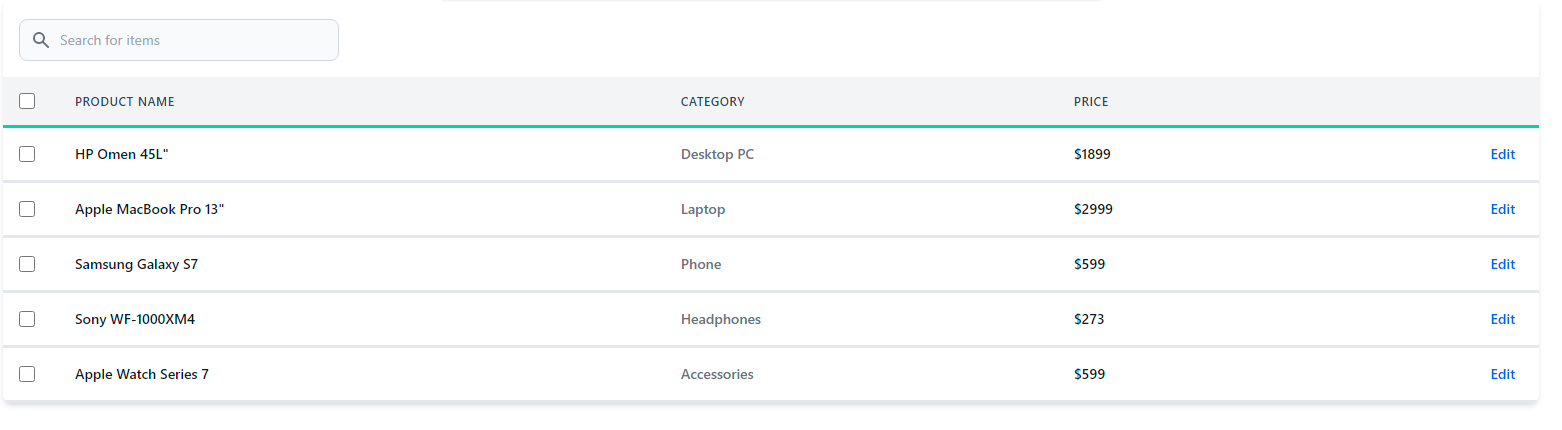
Table with Users Profiles
1<div class="overflow-x-auto m-2 rounded-md border p-5">2 <h1 class="font-sans text-lg font-bold">Users</h1>3 <div class="flex justify-between">4 <p>A list of all the memebers of the company.</p>5 <button6 class="bg-indigo-500 rounded px-1 py-1 text-white font-sans font-bold border border-indigo-500"7 >8 Add User9 </button>10 </div>11 <table noTheme class="min-w-full bg-white border-gray-500">12 <thead class="border-b bg-white">13 <tr>14 <th class="px-4 py-2 text-left">Name</th>15 <th class="px-4 py-2 text-left">Title</th>16 <th class="px-4 py-2 text-left">Status</th>17 </tr>18 </thead>19 <tbody>20 <tr class="bg-white">21 <td class=" px-4 py-2">22 <div class="flex">23 <img24 src="https://images.unsplash.com/photo-1463453091185-61582044d556?ixlib=rb-1.2.1&ixid=eyJhcHBfaWQiOjEyMDd9&auto=format&fit=facearea&facepad=2&w=256&h=256&q=80"25 class="h-12 w-12 rounded-full"26 />27 <div>28 <p class="ml-3 text-gray-600 font-medium">Toney Banks</p>29 <p class="ml-3 text-gray-500">tonybanks@example.com</p>30 </div>31 </div>32 </td>33 <td class="px-4 py-2">34 <h2 class="text-gray-600 font-sans font-medium">DevOps</h2>35 <p class="text-gray-500">Development</p>36 </td>37 <td class="px-4 py-2">38 <button39 class="bg-green-100 rounded-md px-2 py-1 text-green-500 font-semibold text-sm"40 >41 Active42 </button>43 </td>44 <td class="hover:text-indigo-700 text-indigo-400 hover:cursor-pointer">45 Edit46 </td>47 </tr>48 <tr class="border-t bg-white">49 <td class=" px-4 py-2">50 <div class="flex">51 <img52 src="https://images.unsplash.com/photo-1517841905240-472988babdf9?ixlib=rb-1.2.1&ixid=eyJhcHBfaWQiOjEyMDd9&auto=format&fit=facearea&facepad=2&w=256&h=256&q=80"53 class="h-12 w-12 rounded-full"54 />55 <div>56 <p class="ml-3 text-gray-600 font-medium">Mary Spencer</p>57 <p class="ml-3 text-gray-500">Maryspenser@example.com</p>58 </div>59 </div>60 </td>61 <td class="px-4 py-2">62 <h2 class="text-gray-600 font-sans font-medium">Software Engineer</h2>63 <p class="text-gray-500">Development</p>64 </td>65 <td class="px-4 py-2">66 <button67 class="bg-green-100 rounded-md px-2 py-1 text-green-500 font-semibold text-sm"68 >69 Active70 </button>71 </td>72 <td class="hover:text-indigo-700 text-indigo-400 hover:cursor-pointer">73 Edit74 </td>75 </tr>76 <tr class="bg-white border-t">77 <td class="px-4 py-2">78 <div class="flex">79 <img80 src="https://images.unsplash.com/photo-1494790108377-be9c29b29330?q=80&w=256&h=256&fit=crop&ixlib=rb-4.0.3&ixid=M3wxMjA3fDB8MHxwaG90by1wYWdlfHx8fGVufDB8fHx8fA%3D%3D"81 class="h-12 w-12 rounded-full"82 />83 <div>84 <p class="ml-3 text-gray-600 font-medium">Mia Diaz</p>85 <p class="ml-3 text-gray-500">DiazMia@example.com</p>86 </div>87 </div>88 </td>89 <td class="px-4 py-2">90 <h2 class="text-gray-600 font-sans font-medium">Copywriter</h2>91 <p class="text-gray-500">Program</p>92 </td>93 <td class="px-4 py-2">94 <button95 class="bg-green-100 rounded-md px-2 py-1 text-green-500 font-bold text-sm"96 >97 Active98 </button>99 </td>100 <td class="hover:text-indigo-700 text-indigo-400 hover:cursor-pointer">101 Edit102 </td>103 </tr>104 <tr class="bg-white border-t">105 <td class="px-4 py-2">106 <div class="flex">107 <img108 src="https://images.unsplash.com/photo-1507003211169-0a1dd7228f2d?q=80&w=256&h=256&fit=crop&ixlib=rb-4.0.3&ixid=M3wxMjA3fDB8MHxwaG90by1wYWdlfHx8fGVufDB8fHx8fA%3D%3D"109 class="h-12 w-12 rounded-full"110 />111 <div>112 <p class="ml-3 text-gray-600 font-medium">Henry Donny</p>113 <p class="ml-3 text-gray-500">henryDonny@example.com</p>114 </div>115 </div>116 </td>117 <td class="px-4 py-2">118 <h2 class="text-gray-600 font-sans font-medium">Marketing</h2>119 <p class="text-gray-500">Content Manager</p>120 </td>121 <td class="px-4 py-2">122 <button123 class="bg-green-100 rounded-md px-2 py-1 text-green-500 font-bold text-sm"124 >125 Active126 </button>127 </td>128 <td class="hover:text-indigo-700 text-indigo-400 hover:cursor-pointer">129 Edit130 </td>131 </tr>132 <tr class="bg-white border-t">133 <td class="px-4 py-2">134 <div class="flex">135 <img136 src="https://images.unsplash.com/photo-1531256456869-ce942a665e80?q=80&w=256&h=256&fit=crop&ixlib=rb-4.0.3&ixid=M3wxMjA3fDB8MHxwaG90by1wYWdlfHx8fGVufDB8fHx8fA%3D%3D"137 class="h-12 w-12 rounded-full"138 />139 <div>140 <p class="ml-3 text-gray-600 font-medium">Sophia Cobly</p>141 <p class="ml-3 text-gray-500">coblysophia@example.com</p>142 </div>143 </div>144 </td>145 <td class=" px-4 py-2">146 <h2 class="text-gray-600 font-sans font-medium">Designer</h2>147 <p class="text-gray-500">UX/UI</p>148 </td>149 <td class="px-4 py-2">150 <button151 class="bg-green-100 rounded-md px-2 py-1 text-green-500 font-bold text-sm"152 >153 Active154 </button>155 </td>156 <td class="hover:text-indigo-700 text-indigo-400 hover:cursor-pointer">157 Edit158 </td>159 </tr>160 </tbody>161 </table>162</div>
Preview
Users
A list of all the memebers of the company.
| Name | Title | Status | |
|---|---|---|---|
 Toney Banks tonybanks@example.com | DevOpsDevelopment | Edit | |
 Mary Spencer Maryspenser@example.com | Software EngineerDevelopment | Edit | |
 Mia Diaz DiazMia@example.com | CopywriterProgram | Edit | |
 Henry Donny henryDonny@example.com | MarketingContent Manager | Edit | |
 Sophia Cobly coblysophia@example.com | DesignerUX/UI | Edit |
Conclusion
By following this guide, you’ve learned how to create Tailwind CSS tables, ranging from basic structures to advanced customizations. Tailwind CSS empowers developers to build beautiful, responsive, and functional tables effortlessly, making it an excellent choice for modern web development projects. You can check out windframe to see some awesome tables you can create and other components tailored to your needs. Happy Coding !
Resources
Windframe is an AI visual editor for rapidly building stunning web UIs & websites
Start building stunning web UIs & websites!
